|
TAS Execute |

  
|
|
TAS Execute |
|
Purpose of Program
Use the TASExecute.exe program to manage your TAS professional projects.
By using this program you can change from project to project using one copy of the TAS professional development system.
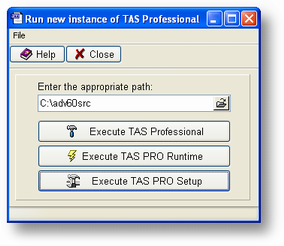
In this program there are 3 buttons that are used to work with your projects. and a field to enter the path of your projects. Aslo the file menu is used to keep a list up to 10 of your most recent projects.
When you enter a path and click one of these buttons you can start TAS Pro IDE/Compiler (TASPRO7.EXE) using the correct path of your project. Also start the runtime (TASRUNTIME.EXE) without the IDE. Or run the TAS PRO setup program (TP7SETUP.EXE) to make changes to the TASPRO.INI file
There are also three menu option.
File Menu Options.
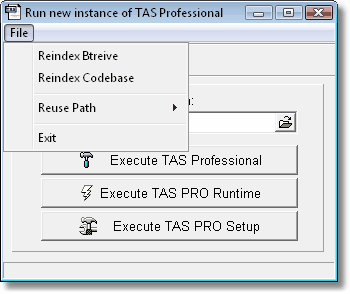
Reindex Btrieve/Pervasive
Use this Option to re index Btrieve/Pervasive Tables in your project without opening the TAS Professional IDE or TASRUNTIME. Since the TAS professional IDE or Runtime opens some of the Data Dictionaries tables. this could prevent you from re indexing these tables. this option will allow you to even re index these tables.
Reindex Codebase
Use this Option to re index Codebase Tables in your project without opening the TAS Professional IDE or TASRUNTIME. Since the TAS professional IDE or Runtime opens some of the Data Dictionaries tables. this could prevent you from re indexing these tables. this option will allow you to even re index these tables.
See also Maintain dictionary for more information in the two re indexing tools.
Exit
Close the TASEXECUTE.EXE program
Page url: http://www.cassoftware.com/tas/manual/tasexecute.htm